
![[Post FB Purity to Twitter]](http://www.fbpurity.com/images/minitweet.png)


Facebook has now started replacing text smileys with graphical emoticon icons in Facebook comments.
The full list of smiley text codes you can use on Facebook
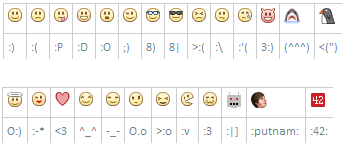
*Update* there is also a mini icon for “thumbs up”, just type (y) to display a “thumbs up” icon. Believe it or not, theres also a mini icon for “Poop” just type in :Poop: in a comment and a gross icon of some poop with eyes is displayed.
The text codes should work in both facebook comments and facebook chat too.
How to revert graphical smileys back to text smileys in Facebook
If you don’t want to see the smiley graphics and would instead like to go back to having just the plain text smileys, you can do it by installing the latest version of the F.B. Purity web browser extension.
FB Purity has a built in option for hiding Facebook smileys / emoticons / stickers, you just need to open the FBP options screen and tick the “hide smileys / emoticon graphics” option, then click the “Save and Close” button.
FB Purity is a popular, safe and very highly rated web browser extension, that has been reviewed in publications such as The Washington Post, CNET, Lifehacker and PCWorld. It is designed to clean up and customize Facebook, you can install it and find out more about it here: www.fbpurity.com
*UPDATE 12th Jan 2013* – Facebook now has even more emoticons, that you can access via the “Facebook Messenger” application, you can send them in chat and in Facebook messages (Facebook mail). These graphics include skulls, roses and many other images, that do not have text equivalents.
*UPDATE 29th Jan 2013* – Ive included a built in option to the FB Purity browser extension for hiding the smileys / emoticons now, so you no longer have to use the previous Custom CSS code solution.
*UPDATE* The hide emoticons option in the latest version of F.B. Purity, now also hides “Stickers” in chat.
Get the latest FB Purity via the install page on the F.B. Purity website : https://www.fbpurity.com
Pingback: How to disable smileys in Facebook chat & comments
Pingback: Como deshabilitar emoticones en el chat y comentarios de Facebook | SoftMexico - (SinapsysMx)
I put the first code into the custom CSS, but now it got rid of the text smileys as well. :C Any way to change it to just get rid of the graphic smileys and not all of it?
it seems facebook changed their code which meant my code also stopped working, ive updated the code above now, so it should work again, use the new code and let me know if it works for you,
cheers,
steve
It works! Thank you! :D
wanna thumbs down or f**k**ng [[iidislyk]] [[fingerrr]] [[midfing]]
(n) is a dislike
When using Firefox, most of the text smileys are hidden as well…any help for that ? I’m using the latest code in CSS..
@aila, yes see the update at the bottom of the post above, facebook changed their code, so you need to use a modified version of the code provided previously, the updated code is above.
thanks, now it works :)))
Now we need new-new code? :)
Text smiles hidden again
Firefox 19.0a
@J, ive not got FF19, so cant test it, you are certainly living on the bleeding edge ;)
the smiley hiding code works for me in ff16, BTW double check the above code, its already been updated, it might work for you. Also make sure you have got the latest version of FB Purity installed, as there is a fix for smileys if you change the font size in the fbp font options.
Thank you!
Yea it can be bug in browser, I’m always forgot about this bonus of nightly-builds :)
yeah youre a oak oak :)
I still can not turn off the smileys
did copy & paste then save & close
I am using most current Mozilla Firefox
check that you didnt paste the code into the “custom text filter” box, instead of the “custom css box”
Thank you!!
working now
try puting a word between [[ and ]]
those only work in facebook chat though, not in facebook comments
Try :poop:, or [[midfing]]
there is another symbol that is :poop:
emotions are back…
I copy & paste the css above it works
I sign out of FB & when I sign back in “they are back”
Thanks
update to the latest version of fbp and select the “hide smiley / emoticon graphics” option
hahhahahah its amazing!!!!!!!!!!
Thank you for your Full list of smileys.
this is AMAZING! thx for the help
I think it’s not working now after Facebook emoticon update.
At least in Chrome I still see emoticons despite the fact that “Graphical Smileys / Emoticons” is checked.
still works fine for me
It works now (I don’t know why it didn’t), but it doesn’t replace emoticons with their text equivalent. Can I somehow achieve that with FBPurity?
Doesn’t work for messanger until recent FB update. Only in comments and news.
it’s fixed in the latest version of fbp